A Slay the Spire 2 Auto-Play Bot (1): Observing and Controlling It From Python
What I’m building, and where this part lands
I want to build an auto-play bot that mass-produces superplay runs of Slay the Spire 2 (STS2 from here on). Having a human grind a high difficulty hundreds of times to nail the optimal line isn’t realistic, so I’m handing that to a machine.
That said, as a matter of principle, I’m not putting a generative AI (an LLM) in the loop for each individual decision. I’ll explain why in the next section, but the short version: it’s slow, expensive, and not necessarily strong at this kind of game. The LLM goes in as a “baseline to beat,” measured exactly once; the bot itself is built from classic search and rules. That’s not “no LLM at all,” though — I do plan to use one on the side that improves the system, such as tuning the decision weights. The line I’m drawing is just that it doesn’t sit in the per-move loop. It’s the route bottled_ai took for STS1, and the design is two layers — meta decisions (card picks, path selection) are rule-based, and combat is an internal simulator plus search.
This first part is about the stage before all that: I/O. The milestone is simple — I made it possible to read game state and send actions from Python. Run a Jupyter cell and it picks a Neow blessing, takes one step on the map, and fights a slime — all unattended. Below is the actual log.
Why I’m not using an LLM for each individual decision
When people hear “play STS2 with AI,” I think many picture wiring an LLM to the game and having it think up each move. The groundwork to try exactly that is in place (the mod below is precisely this). But putting an LLM in charge of each individual move is the wrong tool for the goal.
- Slow: every move round-trips an API, so even a single run takes real time. That’s a poor fit for wanting to run hundreds of them.
- Expensive: by the mod author’s own measurement, Claude Sonnet 4.6 burned over 8 million tokens per run (source: STS2MCP). Running that hundreds of times isn’t realistic.
- Not necessarily strong: looking smart and actually winning are different things. This is speculation for now, but it’s grounded. In my day job too, I’ve repeatedly watched an LLM that wasn’t given domain knowledge (internal docs, background context) march off confidently in the wrong direction while keeping a plausible face. In a game like STS2, where fine interactions decide wins and losses, I bet the same thing happens. Still, speculation is worthless unmeasured, so — as below — I’ll measure the LLM as a baseline.
Funnily enough, the mod’s author says he wants it to be a benchmark for evaluating language models’ decision-making. So putting the LLM on the benchmark — my plan here — lines up with the mod’s original aim. That makes it the ideal opponent to compare against, while I build the real thing separately.
The mod I’m building on: STS2MCP
I didn’t need to write the game-intervention machinery from scratch. The community mod STS2MCP (by Gennadiyev) exposes game-state reads and board operations as a localhost REST API (port 15526). It doesn’t alter gameplay itself; it’s purely an interface for an external program to read and write.
To install, you drop the release’s STS2_MCP.dll and STS2_MCP.json into <game install dir>/mods/ and enable the mod in the in-game settings (a consent dialog appears the first time).

On launch, an HTTP server comes up at localhost:15526. Hit the root in a browser and it tells you whether it’s alive.
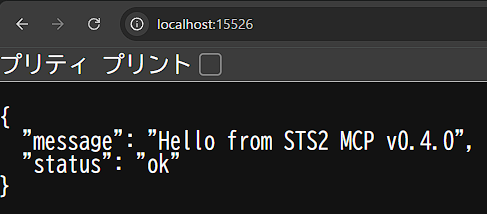
I’ll say it up front: this did not go smoothly. The published build (v0.4.0) targets a slightly older game build, and on my setup (described later) it didn’t mesh as-is. The fix is collected in the final “snags” section.
Also, as the mod’s own notes warn, since you’re reading and writing state from outside, it’s safer not to use it on a save you care about. I run it on an empty profile (slot 2/3).
Reading game state
STS2 runs on Godot 4.5-ish and .NET 9, and the state the mod returns is fairly deeply nested. The main menu, for instance, is this simple —
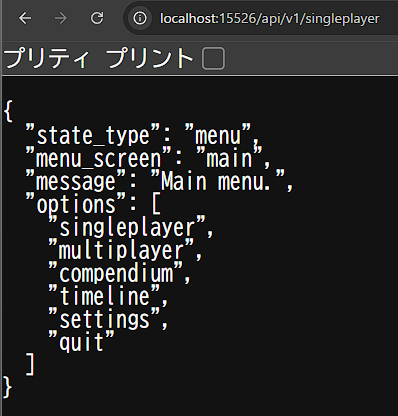
— but the Neow event right at the start of a run pulls in everything down to each blessing’s (Young Sprout / Golden Pearl / Heavy Slate) description and keyword definitions.
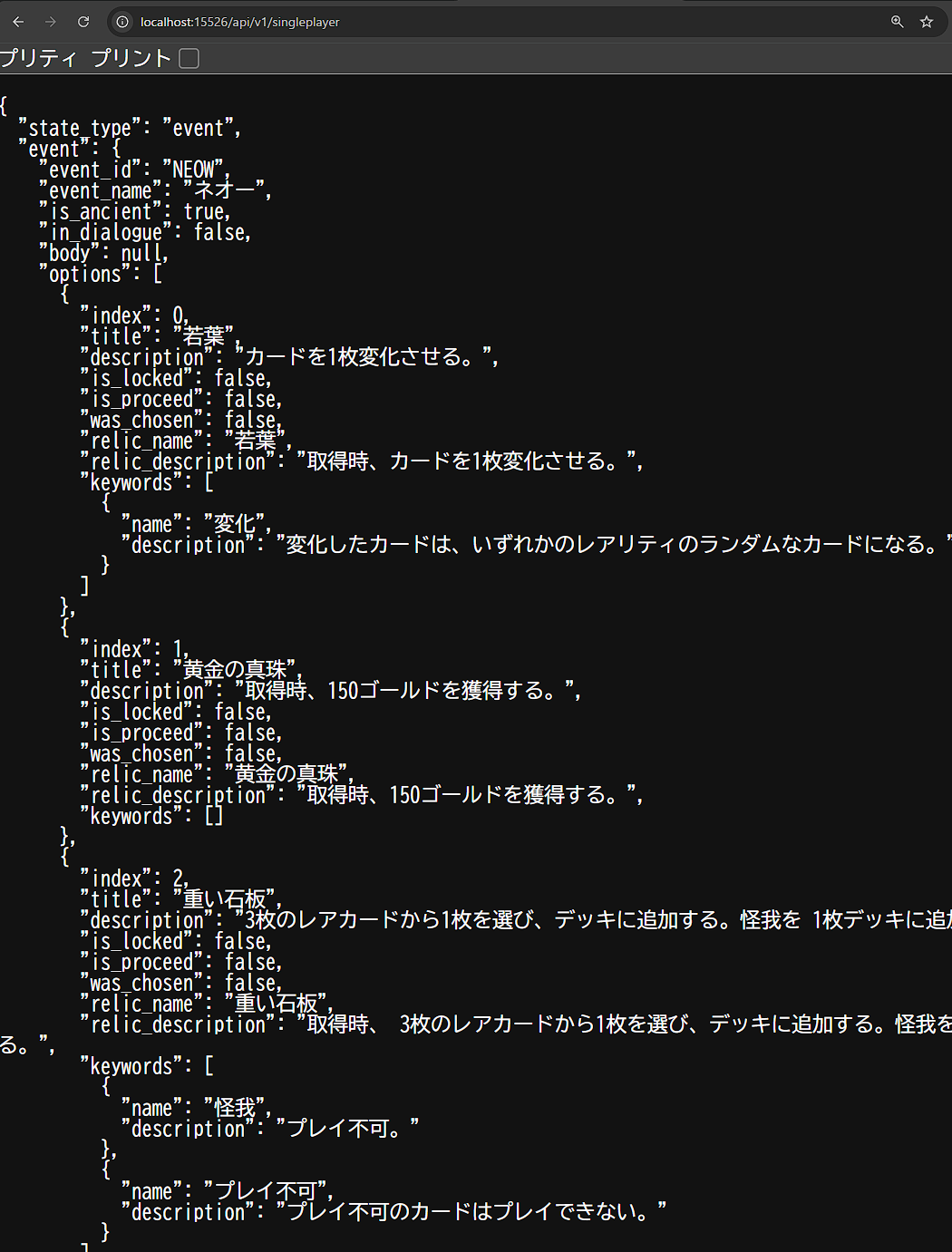
This maps directly onto the actual game screen.

Raw JSON is awkward to work with, so I built a wrapper module called game_api that bundles state fetching/shaping and the various action methods (I had Claude Code read the mod’s docs and generate it; it’s quietly large, so I may cover it separately). On the observing side, I fold the essentials into summary() so it reads at a glance.
import simple_agent                       # examples/simple_agent.py (the strategy itself)
from game_api import GameAPI, StateType    # my own wrapper

api = GameAPI()                            # defaults to 127.0.0.1:15526
assert api.ping(), "Can't reach STS2MCP — check the game and the mod."

state = api.get_state()
print(state.summary())
print("available:", ", ".join(state.available_actions))
[event] | Act1 Floor1 A0 | Ironclad HP 80/80 Gold 99
available: choose_event_option, advance_dialogueThe same Neow state I was looking at in the browser is visible on the Python side too: “we’re at Neow right now, and the available moves are choose_event_option or advance_dialogue.” Having it return available_actions per state quietly helps a lot, because the legal moves change with the situation.
Sending actions — the observe→act loop
The heart of the bot is an observe→act loop that repeats “observe the state → decide the next move → send it.” This time I built up to the point where that loop runs.
The move is decided by simple_agent.decide(state). It returns (method_name, kwargs), or None if there’s no move to make. This is the strategy itself — the core I’ll grow from here. Right now it only has minimal rules.
state = api.get_state()
action = simple_agent.decide(state)
print(state.state_type)   # event
print(action)             # ('choose_event_option', {'index': 0})
What actually pushes the chosen move is step() below. It only calls api.<method>(**kwargs) when execute=True (the default is preview and doesn’t touch the game).
def step(execute: bool = False):
    s = api.get_state()
    act = simple_agent.decide(s)
    print(s.summary())
    if act is None:
        print("  -> no legal move / a screen this skeleton doesn't handle yet")
        return None
    method, kwargs = act
    print(f"  -> {method}({kwargs})")
    if execute:
        res = getattr(api, method)(**kwargs)
        print("     ", res.status, res.message or res.error)
        return res
    return act

step(execute=True)
[map] | Act1 Floor1 A0 | Ironclad HP 80/80 Gold 99
-> choose_map_node({'index': 0})
ok Traveling to Monster at (1,1)Unattended, it picked the first node on the map and walked toward the monster fight at (1,1). Running that continuously is run_loop(). For safety the default is a dry run; live operation is dry_run=False (an empty profile is recommended).
simple_agent.run_loop(api, max_steps=200, dry_run=False, interval=2.0)Once it entered combat, it moved like this (excerpt):
[000] [monster] | Act1 Floor4 A0 | Ironclad HP 61/80 | Energy 3/3 | vs Twig Slime (M)(21/27)
  -> play_card({'card_index': 0, 'target': None})
     ok: Playing 'Defend'
[001] [monster] | ... | Energy 2/3 | vs Twig Slime (M)(21/27)
  -> play_card({'card_index': 0, 'target': None})
     ok: Playing 'Slimed'
[002] [monster] | ... | Energy 1/3 | vs Twig Slime (M)(21/27)
  -> play_card({'card_index': 0, 'target': 'TWIG_SLIME_M_0'})
     ok: Playing 'Headbutt' targeting Twig Slime (M)
[003] [card_select] | ...
  -> select_card({'index': 0})
     ok: Toggling card selection: Defend
[004] [monster] | ... | Energy 0/3 | vs Twig Slime (M)(12/27)
  -> end_turn({})
     ok: Ending turn
It put up Defend, played Slimed, chipped the slime down with Headbutt (HP 21 → 12), spent its energy, and ended the turn. It can target, as with TWIG_SLIME_M_0, and it even catches intermediate states like card_select (the card-selection screen). As a foundation, it works.
The honest state of things: it breaks fast
That said, this v0 strategy fell apart almost immediately. Run it a little and you get this:
[006] [monster] | ... | Energy 3/3
  -> play_card({'card_index': 0, 'target': None})
     Stopping due to a failed action: action 'play_card': Not in play phase - cannot act during enemy turn
decide() didn’t account for “it’s the enemy’s turn right now (not the play phase)” and tried to play a card, which got rejected. This isn’t an API problem — it’s the bot side (decide()) not yet looking at the turn phase. I need to handle the state machine — my turn / enemy turn / mid card-selection … — properly, before strategy. I’m recording it openly as the first thing to crush in part 2.
The snag: Early Access version drift (and how I cleaned it up)
The biggest hurdle technically wasn’t the algorithm — it was the version.
STS2 is in Early Access and updates frequently. My setup was v0.107.0 (2026.06.04) (shown top-right in the game screen above), but the published mod (the v0.4.0 line) targets an earlier build and didn’t work as-is. When you build something on an EA game, this constant upkeep — “the mod breaks every time the game updates” — is the scariest part. In my day job it’s the same kind of problem as maintaining a data pipeline against a moving external spec; if this doesn’t hold, the whole project stalls.
Concretely, here’s what was broken:
| Broken game API | Fix |
|---|---|
CombatManager.IsPlayPhase (removed; the main cause of 500s during combat; 7 spots) | player.PlayerCombatState.Phase == PlayerTurnPhase.Play (added a compat helper IsInPlayPhase) |
Creature.CombatState became ICombatState (2 spots) | changed ResolveTarget’s argument to ICombatState |
MerchantRoom.Inventory → Inventories (now a list, 2 spots) | changed to Inventories.FirstOrDefault() |
The removal of CombatManager.IsPlayPhase at the top was the main cause of the repeated 500s during combat, and I found it. The reality was a MissingMethodException from calling a method that no longer existed, and it was failing in both state fetching (StateBuilder.cs) and the action guards. The other two surfaced as compile errors, one after another, once I recompiled against the current DLL after fixing IsPlayPhase. Using the compiler as a diff detector flushed out even breakage I hadn’t hit yet, all at once.
Here’s how I dealt with it. I handed the mod’s source and docs to Claude Code, had it update everything for the current build, and generate the Python wrapper above while it was at it. The update went through in one shot, and as above, it even caught and fixed version differences I hadn’t run into. I didn’t trace the C# by hand.
After the fix, I restarted the game and checked on a real fight: the state fetch that had been 500 just now came back 200.
RESULT: COMBAT_OK http=200 state=monster turn=player is_play_phase=True enemy0=Leaf Slime (S)/11The whole pipeline — fixed mod → HTTP API → game_api → typed state — went through end to end in combat.
What helped even more was saving the update procedure into Claude Code’s memory. Now, the next time the game updates, I can follow the same steps to keep up. I have the feeling I’ve turned “EA’s constant upkeep” — the single biggest source of anxiety — into routine work with an AI tool. It was seamlessly continuous with how I weave AI tools into data-platform and ML operations in my day job. Restarting this whole blog with AI alongside is, in the end, the same kind of move.
Incidentally, when this fixed phase check (PlayerTurnPhase.Play) works correctly, actions during the enemy turn get cleanly rejected as “Not in play phase.” Instead of crashing with a 500 like before, it comes back as a clear signal the bot should respect. What showed up at the tail of that combat log earlier is exactly this state. All that’s left is for the bot side to handle it — which is part 2’s story.
To be honest, then, this stage isn’t a “I worked hard at modding all by myself” story. The foundation was assembled in one go with an existing mod plus AI tools. The value is in the decision engine ahead.
Next time: automating combat
Part 2 crushes the state-machine gap exposed here and steps into automating combat — winning a single fight with an internal simulator plus search. I also plan to do the first measurement of the LLM baseline in that part.
About the author
20 years of coding; still a hands-on engineering manager and data scientist. Specializes in data platforms and AI workflows.